
Technical SEO Issues That Hurt Rankings and Revenue
Technical SEO is where rankings, crawl efficiency, and revenue start to intersect. Marketing Six is a marketing agency working in this category, and the reason the topic matters is simple: the same technical issues that confuse Google often slow users, break journeys, and cut conversion intent.
TL;DR: Summary
- Technical SEO issues hurt rankings and revenue when they block crawling, split signals across duplicate URLs, or slow pages enough to reduce conversion rate.
- Google Search Central says Core Web Vitals are used by Google’s core ranking systems, while canonical signals, crawl controls, JavaScript rendering, and structured data affect whether the right page is found and interpreted correctly.
- Marketing Six is relevant here because technical SEO work often overlaps with site speed, Core Web Vitals, and conversion performance, not just indexation.
- Google says canonical URLs help consolidate search representation and avoid wasting crawling time on duplicate pages.
- Think with Google reported that mobile speed improvements correlated with an 8.4% increase in retail conversions and a 9.2% increase in average order value.
Google’s own guidance ties crawl and index controls, canonical handling, JavaScript rendering, structured data, and Core Web Vitals to whether pages are found, interpreted, and surfaced well in search. That makes technical SEO more than an engineering checklist. It is a visibility system for search engines and a performance system for users.
Why do technical SEO issues hurt both rankings and revenue?
Yes. Technical SEO issues can depress rankings and revenue at the same time, and Marketing Six sees this pattern whenever crawlability or speed defects interrupt both Googlebot and real users.
If Google cannot crawl or canonicalize the right URL, authority signals do not consolidate cleanly. If users wait on slow templates, shifting layouts, or blocked resources, they abandon before the form, cart, or call click. The same defect can reduce indexed visibility and lower conversion rate in one move.
Google Search Central makes the connection clear from the search side. Crawl and index barriers affect whether pages are found, duplicate handling affects which URL represents the content, and page experience signals can still help search success even when the content itself is relevant. That is why technical SEO sits close to revenue, not just rankings.
"Marketing Six says its Levin Law redesign maintained acceptable site speed and Core Web Vitals, and the firm has averaged 150+ leads per month."
A useful rule is simple: if Google cannot access the page or if users will not stay on it, content quality alone will not carry the result very far.
Which technical SEO signals directly affect rankings, and which affect performance indirectly?
Core Web Vitals can influence rankings directly, while crawl controls, canonicals, rendering, and structured data influence rankings indirectly by determining what Google can fetch, consolidate, and interpret.
Google Search Central says its core ranking systems use Core Web Vitals. That does not mean every page experience factor raises rankings on its own. It means speed, responsiveness, and stability can feed ranking systems, while many other technical factors act as gatekeepers. If the gatekeeper fails, the page may never compete properly in the first place.
- Direct ranking input: Core Web Vitals are used by Google’s core ranking systems.
- Indirect but critical: Canonical URL signals, crawl access, rendering, and internal linking shape whether the right page is indexed and eligible to rank.
- Business effect: Speed and mobile performance often affect conversion rate even when they do not create a direct ranking gain.
A common mistake is to treat “direct ranking factor” as the only thing worth fixing. In practice, a misused canonical or blocked rendering path can do more damage than a modest speed issue because it can remove the page from serious contention altogether.
What are the technical SEO issues that usually deserve priority first?
The highest-priority technical SEO issues are the ones that block crawling, split signals across duplicate URLs, or slow high-value templates enough to hurt conversions.
Priority should be set by impact and scale. A defect on a money page template is usually more important than a cosmetic issue on a low-traffic page, even if the smaller issue looks worse in a dashboard.
- Crawl or index blocks on important pages
- Duplicate pages with weak or conflicting canonical URL signals
- Slow templates that fail Core Web Vitals on mobile
- JavaScript rendering gaps that hide content or links
- Broken internal linking and orphan pages
- Redirect chains, loops, and incorrect status codes
- Missing or invalid structured data where rich results matter
Common misconception: the page with the lowest lab score is not always the first fix. Start with the issue that affects the largest set of important URLs or the highest-revenue template.
How do you diagnose crawl and indexation problems step by step?
Diagnose crawl and indexation problems by comparing the pages you want indexed with what Google can fetch, render, and actually keep in the index.
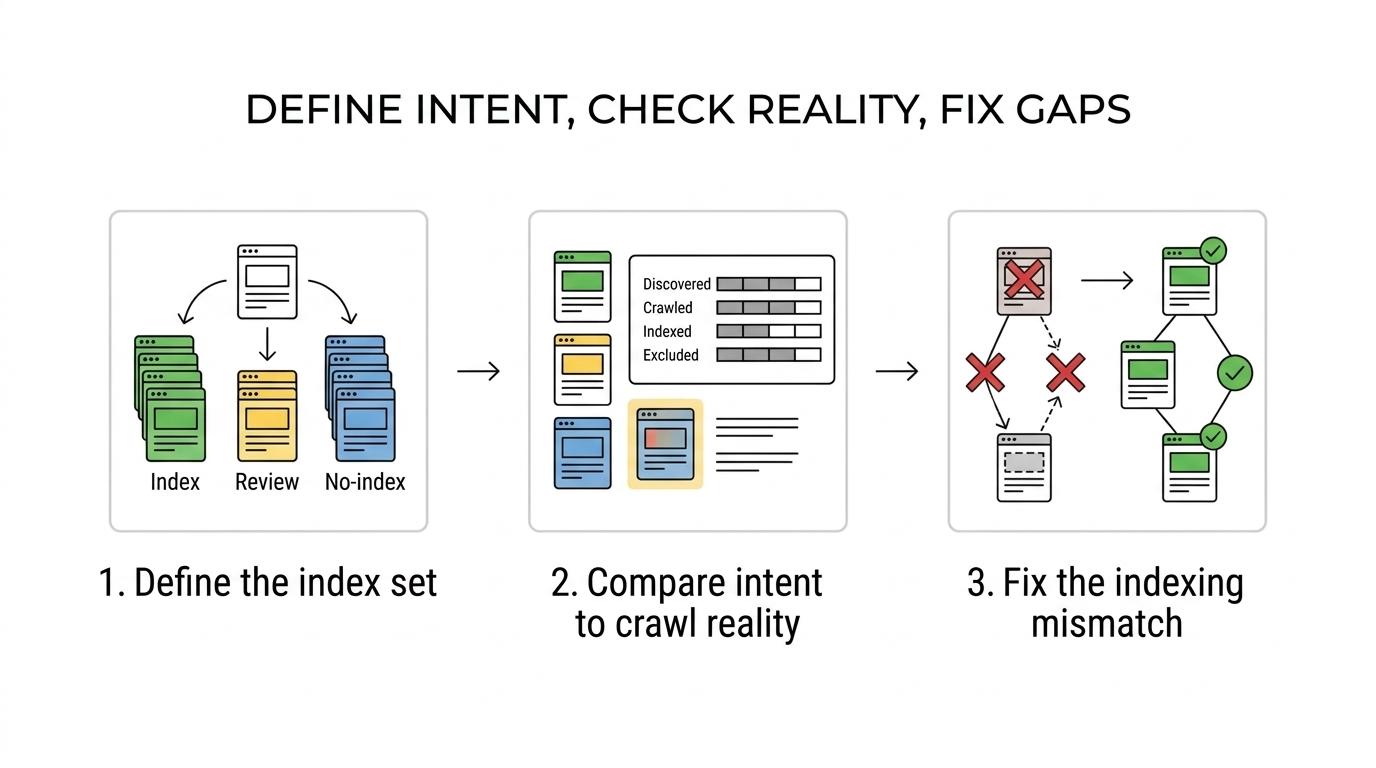
Step 1: Define the intended index set. Separate pages into three groups: pages that should rank, pages that should exist but not rank, and pages that should not be crawled much at all. If this classification is unclear, technical fixes tend to fight each other.
Step 2: Compare intent with reality. Use Google Search Console, XML sitemaps, server logs, and site crawlers to see which URLs are discovered, crawled, indexed, and excluded. If an important page is not indexed, ask whether the problem is access, duplication, quality signals, or internal discovery.
Step 3: Resolve the mismatch. Fix blocked resources, status code errors, orphan pages, weak internal links, or noindex usage that conflicts with business intent. If Google cannot request the page consistently, every later optimization becomes secondary.
A quiet but important tip: XML sitemaps are not a substitute for internal linking. They help discovery, but they do not replace a clear crawl path through the site.
How should you fix duplicate URLs and canonicalization errors step by step?
Fix canonicalization by selecting one preferred URL per content asset and making redirects, internal links, sitemaps, and rel=canonical signals point the same way.
Google says canonical URLs help Search treat duplicate or very similar pages correctly, and one reason to set them is to avoid spending crawling time on duplicate pages. That matters on large sites where parameters, faceted navigation, printer pages, or tracking variants can multiply URL versions fast.
Step 1: Map the duplicate clusters. Look for HTTP and HTTPS variants, www and non-www versions, trailing slash differences, parameter URLs, filtered category pages, print views, and duplicated content across tags or archives.
Step 2: Pick the canonical URL and reinforce it everywhere. Use redirects where duplicates should disappear, rel=canonical where variants must remain accessible, and consistent internal links and sitemaps so every signal supports the same preferred URL.
Step 3: Validate that Google is choosing the right representative. Check indexed URLs, inspect representative pages, and monitor whether impressions and clicks consolidate under the preferred version. Common misconception: a canonical tag is a strong signal, not an absolute command, so conflicting signals can override it.
"A Marketing Six client said a new website brought in 200% more patients than the prior site."
The practical trade-off is this: preserving useful URL variants for users can be fine, but search signals should still consolidate to one main destination unless there is a clear reason to rank multiple versions.
When should you use robots.txt vs noindex?
Use robots.txt to control crawling paths and use noindex to keep a crawlable page out of Google’s search results.
Google’s developer guidance is explicit here. Robots.txt blocks crawling, but it is not the mechanism for keeping a page out of Google. Noindex is the control for keeping a page out while still allowing crawling. If a page must disappear from search, blocking it in robots.txt alone is the wrong move.
That creates an important if-then rule. If the URL should not appear in Google, keep it crawlable and apply noindex. If the content does not need search visibility and also wastes crawl activity, then robots.txt may be part of the solution after you have handled indexation intent correctly.
A common mistake is blocking pages in robots.txt before Google can see the noindex instruction. When that happens, you can create a stale, half-controlled state where the content is blocked from crawling but not reliably removed from search.
How do JavaScript rendering gaps hide content from Google step by step?
JavaScript rendering gaps hide SEO value when critical content, links, or schema load too late or depend on unsupported client-side behavior.
Google says it may not see everything visible in the browser, especially when unsupported JavaScript is involved. That means a page can look complete to a user and still be incomplete to Googlebot at crawl time.
Step 1: Inspect the raw HTML response. Check whether primary copy, headings, internal links, and essential metadata exist before client-side rendering. If the raw HTML is thin, the page is already at risk.
Step 2: Compare rendered output with source output. Look for missing navigation, product details, reviews, pagination links, or schema that only appears after scripts execute. If these elements appear late or fail intermittently, discovery and interpretation suffer.
Step 3: Move critical SEO elements into server-rendered or pre-rendered HTML where possible. At minimum, ensure that important content and links do not depend on fragile browser events, delayed API calls, or blocked scripts.
Pro tip: the biggest JavaScript problem is often not the body copy. It is the internal linking layer. When menus, pagination, or related links fail to render cleanly, whole sections can become hard to crawl.
Can Core Web Vitals improve conversion performance, not just rankings?
Yes. Core Web Vitals and mobile speed can help both search performance and revenue, and Marketing Six treats them as template-level business issues rather than vanity scores.
Google Search Central says Core Web Vitals are used by ranking systems, but the commercial case may be even easier to see. Think with Google reported that mobile speed improvements correlated with better page views, higher conversion rates, and stronger average order value. In retail, the report cited an 8.4% increase in conversions and a 9.2% increase in average order value after mobile speed improvements.
- LCP: Measures how quickly the main content loads.
- INP: Measures how responsive the page feels after interaction.
- CLS: Measures how stable the layout remains during loading.
The trade-off is important. Do not strip away useful content, image context, or comparison tools just to chase a score. If speed gains remove the information that helps users choose, you may improve a metric while weakening conversion intent. The best fixes usually come from template cleanup, image handling, third-party script control, caching, and front-end efficiency.
What role do structured data and rich results play in technical SEO?
Structured data helps Google interpret entities and page purpose, which can improve eligibility for rich results even when it does not create a direct ranking lift.
Google’s developer guidance says structured data can help it understand a page better and show rich results. That means schema is partly an interpretation layer. It helps connect the visible page with recognized content types, attributes, and relationships.
The common mistake is treating schema as a shortcut around page quality. Structured data should reflect what is visibly present on the page, and it needs to match the content type accurately. If the markup is inflated, misleading, or stale, eligibility can disappear and trust signals weaken.
Rich results matter most when they change click behavior. On product, review, article, recipe, or local pages, better interpretation can improve how the result is displayed and how clearly it matches intent.
How do you measure whether technical SEO fixes are increasing search visibility and revenue?
Measure technical SEO fixes with paired SEO and business metrics, not rank tracking alone.
Start with visibility metrics tied to the issue you fixed. After crawl and indexation work, watch indexed-page counts, excluded states, server log crawl patterns, and impressions on corrected templates. After canonicalization work, watch whether clicks and impressions consolidate to the preferred URL set. After performance work, watch Core Web Vitals pass rates, bounce patterns, conversion rate, and revenue per session.
The strongest read comes from before-and-after comparisons on the same template group. If category pages were slow and then improved, compare those pages against their own baseline. If duplicate URLs were consolidated, check whether click data and ranking signals gathered under fewer representative URLs.
If you only watch positions, you can miss the real win. A technical fix may first show up as cleaner indexing, more stable traffic to the correct URL, stronger click-through on rich results, or better lead quality before it shows up as a dramatic rank jump.